How to Announce Giveaway Winners (With Message Templates)
Announce giveaway winners in a way that builds trust: what to include, a public post and private message template, and how to share proof of the draw.
By the Winologic team · Updated: · How we write our guides
To announce giveaway winners, post the result publicly where the giveaway ran, message each winner privately from the official account, and include the prize, how winners were chosen, the claim deadline and a thank-you to everyone who entered. Link to your draw record so participants can see the result was fair.
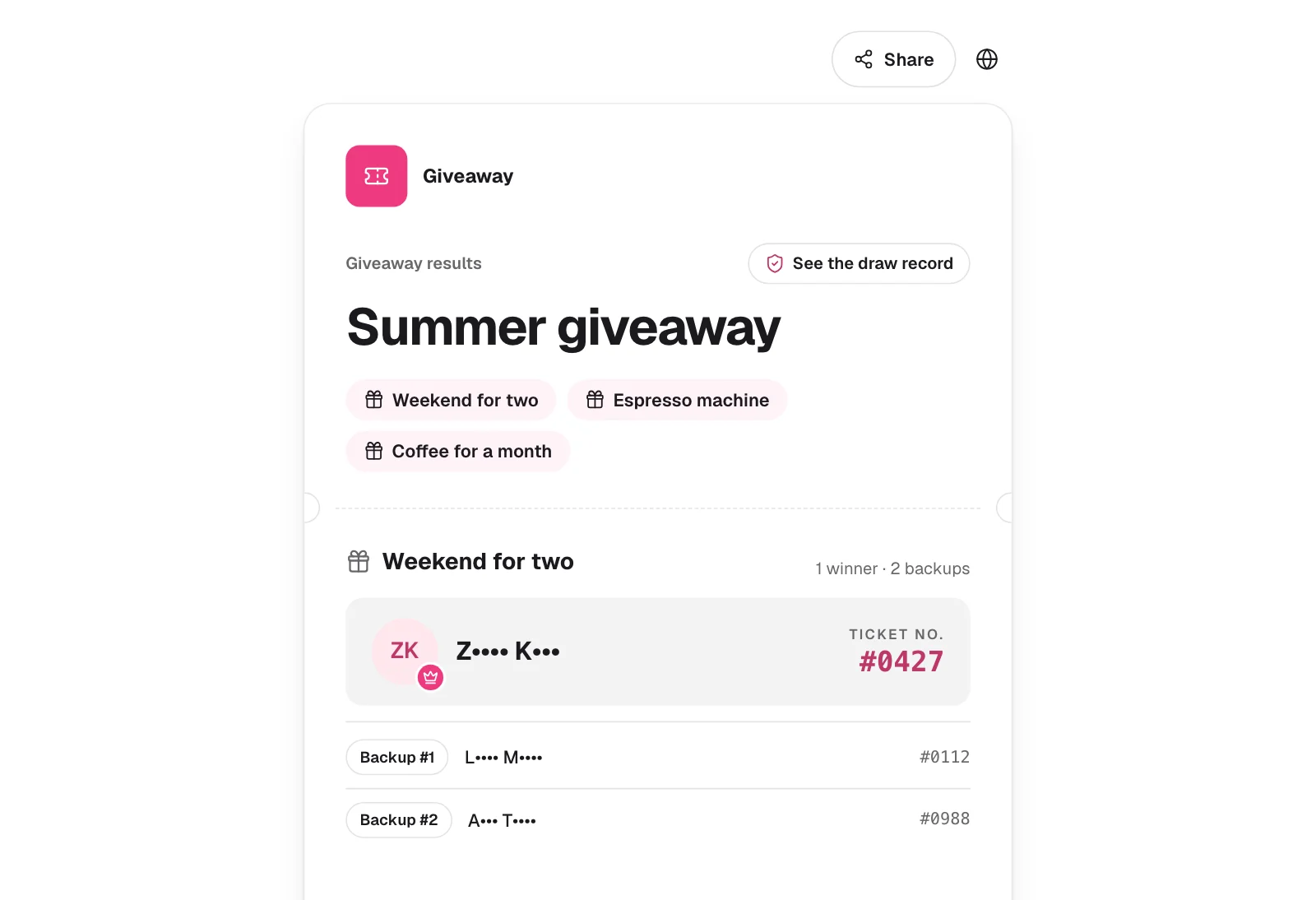
Announce in public and in private
A good announcement has two parts. The public part, a post, a story or a results page, shows everyone that the giveaway ended properly. The private part, a direct message or an email, tells the winner what to do next and keeps personal details out of public view.
Do both on the same day if you can. Silence after a giveaway closes is what makes participants start to wonder whether it was real. A short holding post saying that the draw happens tonight and the result follows is better than saying nothing.
What a clear announcement includes
Participants want to see five things at a glance: who won, what they won, how the winner was chosen, when it happened and what happens next. Anything else is a bonus.
Keep the tone warm and short. The announcement is not the place to restate every rule, so link or refer to the original giveaway post instead. A friendly line about the prize in use, or the winner's reaction, makes the post more shareable.
- Winner's name or handle, or a masked version if privacy matters.
- The prize and the giveaway it belongs to.
- A one-line description of the draw: random, with duplicates removed.
- The claim deadline and the backup process.
- A thank-you to everyone who took part.
Templates you can adapt
Public post: The draw for [giveaway name] is complete. Congratulations to [winner name or handle], who wins [prize]. Winners were chosen at random from all valid entries after duplicates were removed, and you can see the result on our results page. [Winner], please check your messages and reply by [date and time, time zone]. Thank you to everyone who took part, and keep an eye out for the next one.
Private message: Hi [name], congratulations, you have won [prize] in our [giveaway name] giveaway. To arrange delivery please reply to this message by [date and time, time zone] with [required detail]. We will never ask for a password or a payment. If we do not hear from you by the deadline, the prize passes to the next backup winner.
Both templates are deliberately plain. Replace the square brackets with your details, add your own voice and keep the deadline and the no-password warning, because those two lines do most of the protective work.
Show how the winner was chosen
Proof turns an announcement into an answer to the question everyone silently asks. Share a short recording or screenshot of the draw, mention how many valid entries there were and point people to a page where the result can be checked.
Winologic can publish a public results page with the winners, their ticket numbers and when the draw ran, and names can be masked. Your dashboard also keeps each draw's random seed and a fingerprint of its entry list, so you have a record if anyone asks. Link to the results page from the announcement so people can look for themselves.
Protect your winner and your audience
Fake accounts often pretend to be the organiser right after a giveaway ends and message the winners or other participants asking for money or passwords. Tell your audience in the announcement that you will only contact winners from your official account and never ask for payments or login details.
Ask for permission before you publish a winner's full name, photo or location, and follow what your rules said about publicity. Masking part of a name is an easy compromise.
Step by step
- 01Confirm the winner is eligible
Check the entry against your rules before you announce anything.
- 02Contact the winner privately
Send a message from the official account with the prize, the next step and the reply deadline.
- 03Post the public announcement
Publish winner, prize, method and thanks where the giveaway ran.
- 04Share the proof
Add the draw recording or results page so others can see how the winner was chosen.
- 05Update on the outcome
Edit the post when the prize is claimed or passes to a backup winner.
Frequently asked questions
When should I announce the winner?
+
As soon as the draw is done and you have confirmed the winner is eligible, ideally on the same day. Say in your rules when to expect the result.
Do I have to publish the winner's full name?
+
No. You can use a handle, a first name or a masked name. Follow what your rules promised and ask the winner's consent for photos or extra details.
What if the winner does not reply?
+
Wait until the deadline in your rules, then move to the first backup winner and update your announcement. Keeping a short log of the attempts helps if someone questions the change.
How do I thank people who did not win?
+
Add a short thank-you to the announcement and mention what is coming next. Some businesses also offer a small consolation, such as a discount code, to all participants.
Related guides
All guidesContact winners from your official account, confirm who they are, collect only the details you need and warn followers about impersonation scams.
Learn the four ingredients of a provable giveaway draw: published rules, a fixed entry list, a random method and a saved record of the result.
Write a giveaway caption that gets clear, valid entries: a proven structure, hook lines, plain entry instructions and three templates you can adapt.